Clinic Site Selection

Healthcare & Clinic Site Selection

Healthcare & Clinic Site Selection

Healthcare & Clinic Site Selection

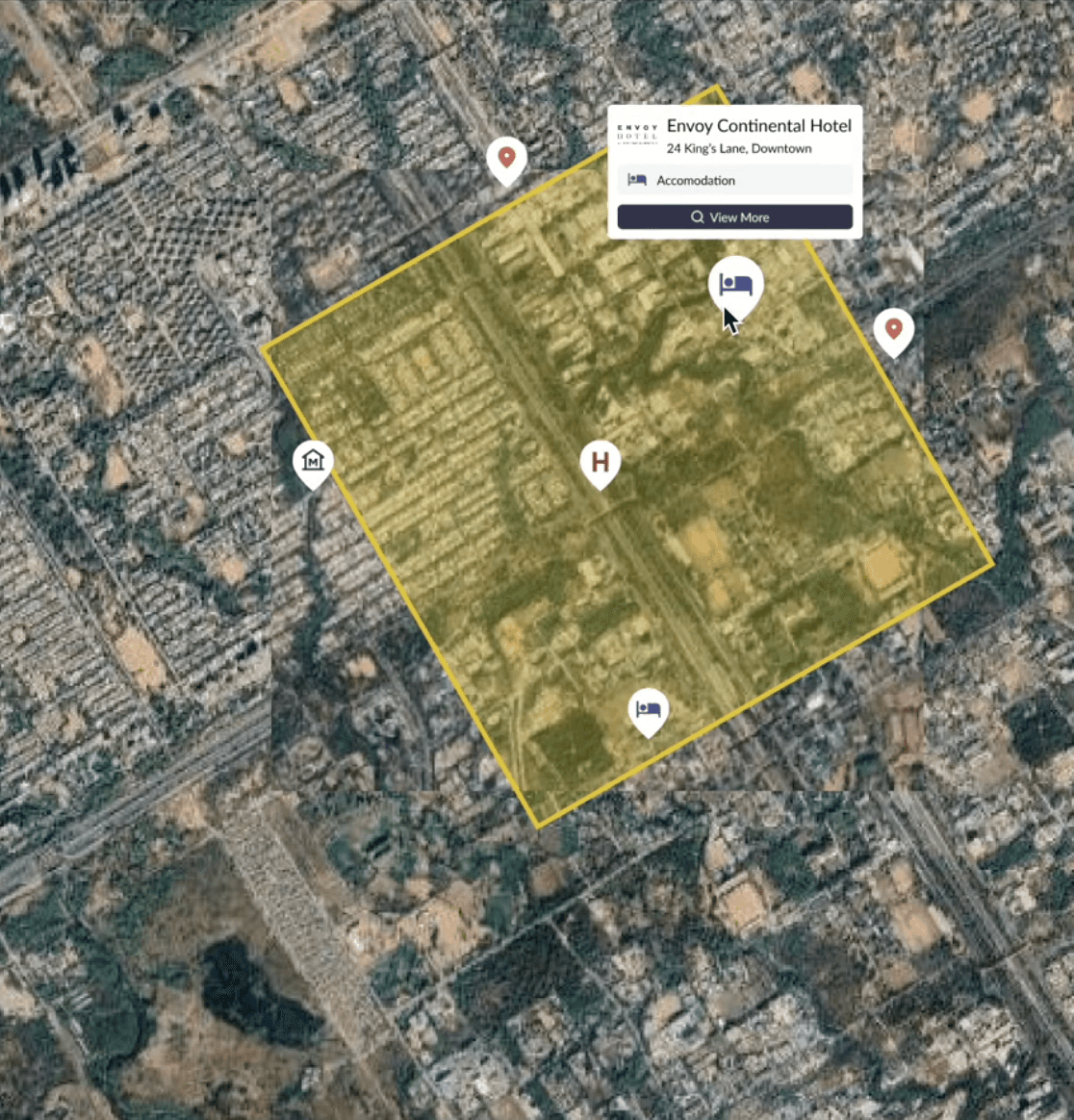
Select optimal clinic locations by mapping population, demographics, drive-time access, and healthcare competition to improve patient access.

Select optimal clinic locations by mapping population, demographics, drive-time access, and healthcare competition to improve patient access.

Select optimal clinic locations by mapping population, demographics, drive-time access, and healthcare competition to improve patient access.

Why It Matters

Challenges in Healthcare Site Planning

Challenges in Healthcare Site Planning

Healthcare providers must balance patient access, competition, and regulatory constraints. Without precise mapping, clinics risk underutilization, poor patient catchment, or inequitable access across communities.


Mapping Patient Access & Demand

With Population Explorer, healthcare organizations can model catchment areas using drive-time isochrones, analyze population demographics and insurance coverage, and map competitor facilities. These insights guide providers to underserved zones, maximize clinic utilization, and improve patient accessibility.

How PopEx Helps

Mapping Patient Access & Demand

With Population Explorer, healthcare organizations can model catchment areas using drive-time isochrones, analyze population demographics and insurance coverage, and map competitor facilities. These insights guide providers to underserved zones, maximize clinic utilization, and improve patient accessibility.

How PopEx Helps

Mapping Patient Access & Demand

With Population Explorer, healthcare organizations can model catchment areas using drive-time isochrones, analyze population demographics and insurance coverage, and map competitor facilities. These insights guide providers to underserved zones, maximize clinic utilization, and improve patient accessibility.

How PopEx Helps

Why PopEx Works for Healthcare

PopEx combines demographic and socioeconomic layers with Google POI data, providing a full view of community health landscapes. Clinics can evaluate demand, reduce overlap, and ensure compliance with zoning while cutting site planning cycles significantly.

Differentiators

Why PopEx Works for Healthcare

PopEx combines demographic and socioeconomic layers with Google POI data, providing a full view of community health landscapes. Clinics can evaluate demand, reduce overlap, and ensure compliance with zoning while cutting site planning cycles significantly.

Differentiators

Why PopEx Works for Healthcare

PopEx combines demographic and socioeconomic layers with Google POI data, providing a full view of community health landscapes. Clinics can evaluate demand, reduce overlap, and ensure compliance with zoning while cutting site planning cycles significantly.

Differentiators

Expanding Clinic Networks Effectively

Healthcare providers rely on PopEx to identify gaps in service coverage, plan equitable access, and prioritize sites with the strongest demographic fit. The result: higher patient satisfaction, stronger utilization rates, and improved community outcomes.

Proof in Action

Expanding Clinic Networks Effectively

Healthcare providers rely on PopEx to identify gaps in service coverage, plan equitable access, and prioritize sites with the strongest demographic fit. The result: higher patient satisfaction, stronger utilization rates, and improved community outcomes.

Proof in Action

Expanding Clinic Networks Effectively

Healthcare providers rely on PopEx to identify gaps in service coverage, plan equitable access, and prioritize sites with the strongest demographic fit. The result: higher patient satisfaction, stronger utilization rates, and improved community outcomes.

Proof in Action

Last updated

Nov 7, 2025

Population Explorer

What Our Users Are Saying

What Our Users Are Saying

What Our Users Are Saying

Frequently Asked Use Cases

Frequently Asked Use Cases

Frequently Asked Use Cases

How clinic site selection works in practice

Clinic site selectors must balance access, coverage, and sustainable volumes. Selecting the right clinic location improves patient outcomes and operational efficiency; the wrong one strains staff, increases travel times, and underutilizes capacity. Population Explorer helps operators evaluate prospective sites with consistent, data-backed methods, leading to a vastly improved clinic site selection process.

  1. Define or import service areas - Draw buffers, build isochrones for drive- and walk‐time access, or upload existing polygons from prior planning cycles. Assess demographic coverage within multiple travel-times across your entire clinic site portfolio.

  2. Layer demand, access, and competition - Combine LandScan and WorldPop demographics with income and household layers. Overlay Google Places POIs to see hospitals, urgent care, pharmacies, and other providers. This highlights underserved pockets and saturation risks. Combine drive-time with population coverage to narrow down optimal sites for your clinic expansion.

  3. Export for operations and boards - Generate reports, shapefiles, and ZIP lists for compliance reviews, certification discussions, or board presentations.

Many teams also assess payer mix, primary vs specialty demand, and travel frictions (congestion, transit). A location with strong demographics can still underperform if access is constrained or adjacent providers skew the case mix.

For orientation, see Start Here and About Our Data.

FAQs every healthcare operator asks

How do we size demand for a new clinic?
Clinic site selection needs to be dynamic, informed by accurate data. Combine LandScan and WorldPop with household income layers to quantify the addressable population within a range of travel-distances. Calibrate with historical visit volumes if available.

Can we analyze access by travel time, not distance?
Yes. Use Isochrone shapes to map drive-time catchments and identify gaps in coverage. Narrow down candidate clinic sites to those with the optimal blend of travel-time and population coverage.

How do we account for payer mix?
While PopEx does not track individual claims, demographic proxies (income, age distribution) can inform payer-mix assumptions at the trade-area level. In addition, PopEx services team can provide bespoke reports layering population data with additional layers (including payer-mix) to create a more robust clinic site selection process.

Can we import provider lists or patient leads?
Yes. Upload CSVs of clinic or provider locations for competitive context and steer the clinic site selection process towards 'whitespace' areas: those optimal demographic pockets not otherwise served by a competitor. See Importing CRM Accounts and Working with Marker Files.

How do we identify underserved areas?
Overlay POIs for providers and pharmacies with demographics to flag low-access pockets or long travel-time zones. Draw catchment zones (using isochrones or buffers) to narrow down candidate sites and select the clinic sites most aligned with your target markets.

Is this useful for urgent care vs specialty clinics?
Yes. You can develop clinic site selection criterion favoring either general access or specialty catchments, all modeled with the same workflow, then tailored to service lines.

Will this scale to regional and international networks?
Yes. LandScan and WorldPop provide global baselines for consistent clinic site selection planning across markets.

Can we export outputs for compliance or board review?
Yes. Export ZIP lists, shapefiles, and formatted reports for committees and regulators.

How current is the data compared to census?
Census releases can lag 5-10 years. PopEx refreshes annually and includes projections to reflect present-day growth.

Why census data can distort healthcare site decisions

Census tables may miss rapid suburban growth, urban redevelopment, or migration that materially changes access parameters. For healthcare operators, that can lead to opening clinics in saturated zones while overlooking underserved corridors.

Population Explorer addresses this with annual LandScan and WorldPop updates plus Google Places POIs for hospitals, urgent care, and pharmacies: supporting a more robust and dynamic clinic site selection process. For a data overview, see Census vs LandScan vs WorldPop.

Benefits of a self‐serve planning workflow

Consultant reports can be slow and quickly outdated, not optimal for a dynamic clinic site selection process. A self-serve model lets operations, real estate, and compliance collaborate directly.

  • Agility - Test scenarios for capacity, service mix, and access gaps.

  • Cost control - Reduce recurring consultant spend.

  • Accuracy - Plans reflect refreshed LandScan, WorldPop, and Google Places data.

  • Transparency - Provide leadership with defensible, reproducible evidence.

For workflows, see Balance Territories.

Comparing approaches to clinic site selection

Clinic site selection approaches differ in freshness, defensibility, and cost:

  • Census spreadsheets - Low cost, but laggy and weak for access planning.

  • Consultant PDFs - Authoritative snapshots, but static and expensive to update.

  • Niche SaaS tools - May lack global coverage or flexible exports.

Population Explorer integrates LandScan, WorldPop, and Google Places in one workflow, producing exports suitable for compliance memos and board packets. Teams can run "what-if" scenarios (e.g., new urgent care vs specialty site, same corridor) and compare coverage gains on a site-by-site basis. For onboarding, see Start Here.

Boards, executives, and compliance officers expect clear ROI framing when approving clinic sites. PopEx exports can be embedded directly into investment decks, showing patient catchments, competitive context, and projected utilization. Teams often test service-line scenarios: what if a new urgent care is added versus a specialty clinic in the same corridor? What if demographic growth shifts in three years? By simulating these futures, leaders can make informed decisions, balancing risk and coverage.

For more resources, see Start Here and About our Data.

How clinic site selection works in practice

Clinic site selectors must balance access, coverage, and sustainable volumes. Selecting the right clinic location improves patient outcomes and operational efficiency; the wrong one strains staff, increases travel times, and underutilizes capacity. Population Explorer helps operators evaluate prospective sites with consistent, data-backed methods, leading to a vastly improved clinic site selection process.

  1. Define or import service areas - Draw buffers, build isochrones for drive- and walk‐time access, or upload existing polygons from prior planning cycles. Assess demographic coverage within multiple travel-times across your entire clinic site portfolio.

  2. Layer demand, access, and competition - Combine LandScan and WorldPop demographics with income and household layers. Overlay Google Places POIs to see hospitals, urgent care, pharmacies, and other providers. This highlights underserved pockets and saturation risks. Combine drive-time with population coverage to narrow down optimal sites for your clinic expansion.

  3. Export for operations and boards - Generate reports, shapefiles, and ZIP lists for compliance reviews, certification discussions, or board presentations.

Many teams also assess payer mix, primary vs specialty demand, and travel frictions (congestion, transit). A location with strong demographics can still underperform if access is constrained or adjacent providers skew the case mix.

For orientation, see Start Here and About Our Data.

FAQs every healthcare operator asks

How do we size demand for a new clinic?
Clinic site selection needs to be dynamic, informed by accurate data. Combine LandScan and WorldPop with household income layers to quantify the addressable population within a range of travel-distances. Calibrate with historical visit volumes if available.

Can we analyze access by travel time, not distance?
Yes. Use Isochrone shapes to map drive-time catchments and identify gaps in coverage. Narrow down candidate clinic sites to those with the optimal blend of travel-time and population coverage.

How do we account for payer mix?
While PopEx does not track individual claims, demographic proxies (income, age distribution) can inform payer-mix assumptions at the trade-area level. In addition, PopEx services team can provide bespoke reports layering population data with additional layers (including payer-mix) to create a more robust clinic site selection process.

Can we import provider lists or patient leads?
Yes. Upload CSVs of clinic or provider locations for competitive context and steer the clinic site selection process towards 'whitespace' areas: those optimal demographic pockets not otherwise served by a competitor. See Importing CRM Accounts and Working with Marker Files.

How do we identify underserved areas?
Overlay POIs for providers and pharmacies with demographics to flag low-access pockets or long travel-time zones. Draw catchment zones (using isochrones or buffers) to narrow down candidate sites and select the clinic sites most aligned with your target markets.

Is this useful for urgent care vs specialty clinics?
Yes. You can develop clinic site selection criterion favoring either general access or specialty catchments, all modeled with the same workflow, then tailored to service lines.

Will this scale to regional and international networks?
Yes. LandScan and WorldPop provide global baselines for consistent clinic site selection planning across markets.

Can we export outputs for compliance or board review?
Yes. Export ZIP lists, shapefiles, and formatted reports for committees and regulators.

How current is the data compared to census?
Census releases can lag 5-10 years. PopEx refreshes annually and includes projections to reflect present-day growth.

Why census data can distort healthcare site decisions

Census tables may miss rapid suburban growth, urban redevelopment, or migration that materially changes access parameters. For healthcare operators, that can lead to opening clinics in saturated zones while overlooking underserved corridors.

Population Explorer addresses this with annual LandScan and WorldPop updates plus Google Places POIs for hospitals, urgent care, and pharmacies: supporting a more robust and dynamic clinic site selection process. For a data overview, see Census vs LandScan vs WorldPop.

Benefits of a self‐serve planning workflow

Consultant reports can be slow and quickly outdated, not optimal for a dynamic clinic site selection process. A self-serve model lets operations, real estate, and compliance collaborate directly.

  • Agility - Test scenarios for capacity, service mix, and access gaps.

  • Cost control - Reduce recurring consultant spend.

  • Accuracy - Plans reflect refreshed LandScan, WorldPop, and Google Places data.

  • Transparency - Provide leadership with defensible, reproducible evidence.

For workflows, see Balance Territories.

Comparing approaches to clinic site selection

Clinic site selection approaches differ in freshness, defensibility, and cost:

  • Census spreadsheets - Low cost, but laggy and weak for access planning.

  • Consultant PDFs - Authoritative snapshots, but static and expensive to update.

  • Niche SaaS tools - May lack global coverage or flexible exports.

Population Explorer integrates LandScan, WorldPop, and Google Places in one workflow, producing exports suitable for compliance memos and board packets. Teams can run "what-if" scenarios (e.g., new urgent care vs specialty site, same corridor) and compare coverage gains on a site-by-site basis. For onboarding, see Start Here.

Boards, executives, and compliance officers expect clear ROI framing when approving clinic sites. PopEx exports can be embedded directly into investment decks, showing patient catchments, competitive context, and projected utilization. Teams often test service-line scenarios: what if a new urgent care is added versus a specialty clinic in the same corridor? What if demographic growth shifts in three years? By simulating these futures, leaders can make informed decisions, balancing risk and coverage.

For more resources, see Start Here and About our Data.

How clinic site selection works in practice

Clinic site selectors must balance access, coverage, and sustainable volumes. Selecting the right clinic location improves patient outcomes and operational efficiency; the wrong one strains staff, increases travel times, and underutilizes capacity. Population Explorer helps operators evaluate prospective sites with consistent, data-backed methods, leading to a vastly improved clinic site selection process.

  1. Define or import service areas - Draw buffers, build isochrones for drive- and walk‐time access, or upload existing polygons from prior planning cycles. Assess demographic coverage within multiple travel-times across your entire clinic site portfolio.

  2. Layer demand, access, and competition - Combine LandScan and WorldPop demographics with income and household layers. Overlay Google Places POIs to see hospitals, urgent care, pharmacies, and other providers. This highlights underserved pockets and saturation risks. Combine drive-time with population coverage to narrow down optimal sites for your clinic expansion.

  3. Export for operations and boards - Generate reports, shapefiles, and ZIP lists for compliance reviews, certification discussions, or board presentations.

Many teams also assess payer mix, primary vs specialty demand, and travel frictions (congestion, transit). A location with strong demographics can still underperform if access is constrained or adjacent providers skew the case mix.

For orientation, see Start Here and About Our Data.

FAQs every healthcare operator asks

How do we size demand for a new clinic?
Clinic site selection needs to be dynamic, informed by accurate data. Combine LandScan and WorldPop with household income layers to quantify the addressable population within a range of travel-distances. Calibrate with historical visit volumes if available.

Can we analyze access by travel time, not distance?
Yes. Use Isochrone shapes to map drive-time catchments and identify gaps in coverage. Narrow down candidate clinic sites to those with the optimal blend of travel-time and population coverage.

How do we account for payer mix?
While PopEx does not track individual claims, demographic proxies (income, age distribution) can inform payer-mix assumptions at the trade-area level. In addition, PopEx services team can provide bespoke reports layering population data with additional layers (including payer-mix) to create a more robust clinic site selection process.

Can we import provider lists or patient leads?
Yes. Upload CSVs of clinic or provider locations for competitive context and steer the clinic site selection process towards 'whitespace' areas: those optimal demographic pockets not otherwise served by a competitor. See Importing CRM Accounts and Working with Marker Files.

How do we identify underserved areas?
Overlay POIs for providers and pharmacies with demographics to flag low-access pockets or long travel-time zones. Draw catchment zones (using isochrones or buffers) to narrow down candidate sites and select the clinic sites most aligned with your target markets.

Is this useful for urgent care vs specialty clinics?
Yes. You can develop clinic site selection criterion favoring either general access or specialty catchments, all modeled with the same workflow, then tailored to service lines.

Will this scale to regional and international networks?
Yes. LandScan and WorldPop provide global baselines for consistent clinic site selection planning across markets.

Can we export outputs for compliance or board review?
Yes. Export ZIP lists, shapefiles, and formatted reports for committees and regulators.

How current is the data compared to census?
Census releases can lag 5-10 years. PopEx refreshes annually and includes projections to reflect present-day growth.

Why census data can distort healthcare site decisions

Census tables may miss rapid suburban growth, urban redevelopment, or migration that materially changes access parameters. For healthcare operators, that can lead to opening clinics in saturated zones while overlooking underserved corridors.

Population Explorer addresses this with annual LandScan and WorldPop updates plus Google Places POIs for hospitals, urgent care, and pharmacies: supporting a more robust and dynamic clinic site selection process. For a data overview, see Census vs LandScan vs WorldPop.

Benefits of a self‐serve planning workflow

Consultant reports can be slow and quickly outdated, not optimal for a dynamic clinic site selection process. A self-serve model lets operations, real estate, and compliance collaborate directly.

  • Agility - Test scenarios for capacity, service mix, and access gaps.

  • Cost control - Reduce recurring consultant spend.

  • Accuracy - Plans reflect refreshed LandScan, WorldPop, and Google Places data.

  • Transparency - Provide leadership with defensible, reproducible evidence.

For workflows, see Balance Territories.

Comparing approaches to clinic site selection

Clinic site selection approaches differ in freshness, defensibility, and cost:

  • Census spreadsheets - Low cost, but laggy and weak for access planning.

  • Consultant PDFs - Authoritative snapshots, but static and expensive to update.

  • Niche SaaS tools - May lack global coverage or flexible exports.

Population Explorer integrates LandScan, WorldPop, and Google Places in one workflow, producing exports suitable for compliance memos and board packets. Teams can run "what-if" scenarios (e.g., new urgent care vs specialty site, same corridor) and compare coverage gains on a site-by-site basis. For onboarding, see Start Here.

Boards, executives, and compliance officers expect clear ROI framing when approving clinic sites. PopEx exports can be embedded directly into investment decks, showing patient catchments, competitive context, and projected utilization. Teams often test service-line scenarios: what if a new urgent care is added versus a specialty clinic in the same corridor? What if demographic growth shifts in three years? By simulating these futures, leaders can make informed decisions, balancing risk and coverage.

For more resources, see Start Here and About our Data.

© 2025 Population Explorer. All rights reserved.

© 2025 Population Explorer. All rights reserved.

© 2025 Population Explorer. All rights reserved.